SciSpace Review 2026: Is This AI Research Tool Worth It?
Last updated: May 2026 | Affiliate disclosure: This post contains affiliate links. We earn a commission if you subscribe — at no extra cost to you.
A research paper lands in your inbox. It is 40 pages of dense methodology, p-values buried in footnotes, and a reference list longer than your thesis chapter. You need to understand it, cite it correctly, and weave it into a draft by Friday. That is the exact workflow SciSpace was built to compress — from raw PDF to cited draft in a single platform. Over several weeks of daily use across literature searches, PDF chats, and the new 2026 report-writing engine, the picture that emerges is genuinely useful but with one critical caveat: the credit system will surprise you at the worst possible moment. This review covers every major feature, the real pricing math, how it stacks up against Elicit, Consensus, and Perplexity, and a straight answer on whether the $12/month Premium tier is worth it for the grad student or working researcher in 2026.
Looking for more AI tools? Explore 500+ ranked options at top10k.com before deciding.
Try SciSpace free and see how far 100 free credits take your next literature search.
SciSpace at a Glance — Verdict and Rating
| Category | Score |
|---|---|
| Feature depth | 4.5 / 5 |
| Ease of use | 4.0 / 5 |
| Pricing transparency | 2.5 / 5 |
| Citation accuracy | 4.0 / 5 |
| Customer support | 2.5 / 5 |
| Overall | 3.8 / 5 |
One-line verdict: SciSpace is the strongest AI tool for turning a pile of PDFs into a structured research draft — but the opaque credit system and unresponsive support make it a frustrating experience the moment you hit a billing question.
Best for: PhD students, academic researchers, clinicians doing literature reviews, and science writers who work primarily with peer-reviewed papers.
Not ideal for: Journalists, marketers, or anyone needing real-time web data alongside research papers.
Aggregate rating: 4.3 / 5 based on 73 reviews on Capterra (May 2026).
What Is SciSpace? (Formerly Typeset.io, 280M+ Papers)
SciSpace started life as Typeset.io, a manuscript formatting tool for journal submission. By 2026 it has evolved into a full AI research assistant trusted by over 1 million researchers globally and adopted by more than 100 educational institutions. The platform is built around a single core idea: academic researchers spend too much time reading papers and too little time synthesizing them. Every feature flows from that premise.
The database underpinning the platform indexes over 280 million academic papers. That number is not a marketing figure plucked from a press release — it is the corpus that powers Literature Review searches, and it covers journals across medicine, biology, computer science, social sciences, and engineering. The depth is sufficient that in most searches across mainstream research fields, the relevant studies surface within the first two pages of results.
The product has gone through two meaningful rebrands (Typeset → SciSpace → current AI-first positioning) and a significant feature expansion since 2024. The 2026 release cycle added an AI report-writing engine and native Zotero integration — the two features that most clearly differentiate it from the competition as of this writing.
SciSpace Copilot — How the In-PDF AI Assistant Works
Copilot is the feature users mention first in reviews, and for good reason. Open any paper inside SciSpace, highlight a sentence or paragraph, and a chat panel appears on the right. You can ask what a statistical method means, request a plain-English explanation of the methodology, or ask how this finding compares to a specific competing study. The response appears inline with the text you highlighted.
In practice, Copilot handles methodology questions well. Questions like "what does a 0.43 Pearson correlation mean in this context" or "explain this regression table for a non-statistician" return clear, accurate answers. The model stays grounded in the paper rather than drifting into general knowledge, which is the behaviour you actually want when you are checking your reading comprehension rather than asking a general question.
The limitation is that Copilot draws on the paper in view, not your entire library simultaneously. Cross-paper synthesis — asking how three different papers' methodologies compare — requires switching to the Literature Review feature. This is a workflow boundary worth understanding before you start a session.
Credit cost note: Each Copilot interaction consumes credits. The exact cost per query is not shown in the UI before you confirm, which is the root cause of the credit-burn complaints detailed in the pricing section below.
Literature Review and Deep Review Agent — Hands-On Test
The Literature Review tool is where SciSpace earns its subscription cost for most researchers. You type a research question — "what is the effect of sleep deprivation on working memory in adults" — and the system queries 280 million papers, returns a ranked list, and lets you configure custom columns: methodology, sample size, key findings, study type. You can export the resulting table directly to a spreadsheet or bibliography manager.
For broad literature surveys, this is genuinely impressive. A search that would take a research assistant two days of database queries, abstract screening, and spreadsheet building takes under thirty minutes inside SciSpace.
Deep Review, released in February 2025 and refined through 2026, goes a step further: it generates a structured analytical summary across multiple papers, grouping findings by theme, surfacing conflicting results, and flagging gaps in the literature. In testing on a well-documented topic (machine learning interpretability), Deep Review produced a coherent seven-paragraph synthesis that accurately reflected the papers it cited. On a narrower niche topic, it was thinner — fewer papers matched and the synthesis read more like a list than an analysis.
The agent-mode capabilities (released July 2025) allow more autonomous task execution: you can queue a research question, have the system pull papers, run Deep Review, and compile findings into a structured document without manual intervention at each step. This works well for systematic research questions with clear parameters.
AI Detector and Paraphraser — Accuracy Notes
SciSpace bundles two writing-adjacent tools that are particularly relevant for student users navigating academic integrity policies.
The AI Detector evaluates whether a piece of text was written by a human or generated by AI. This is useful in both directions: students can check their own writing before submission, and researchers can assess whether a source text they are reviewing was AI-assisted. In testing with known AI-generated text, the detector flagged it consistently. With lightly edited AI output, results were mixed — consistent with the general state of AI detection technology in 2026, not a specific weakness of SciSpace.
On Turnitin compatibility: SciSpace-generated content passed through Turnitin's standard plagiarism check in testing because the citations are real papers and the synthesis is original. However, Turnitin's AI writing detection is a separate layer. If your institution runs AI detection on submissions, treat SciSpace as a research and outlining tool, not a final-draft generator. Always rewrite in your own voice.
The Paraphraser lets you adjust tone (technical to casual and back) and control output length. It is serviceable — useful for softening overly technical language in an abstract or condensing a paragraph — but not a differentiating feature. Most researchers will use it occasionally rather than as a core workflow tool.
SciSpace Pricing 2026 — Free Tier vs Premium and the Credit System
This section is the one competitors do not write clearly, and it is the single most common source of user frustration on TrustPilot and Capterra.
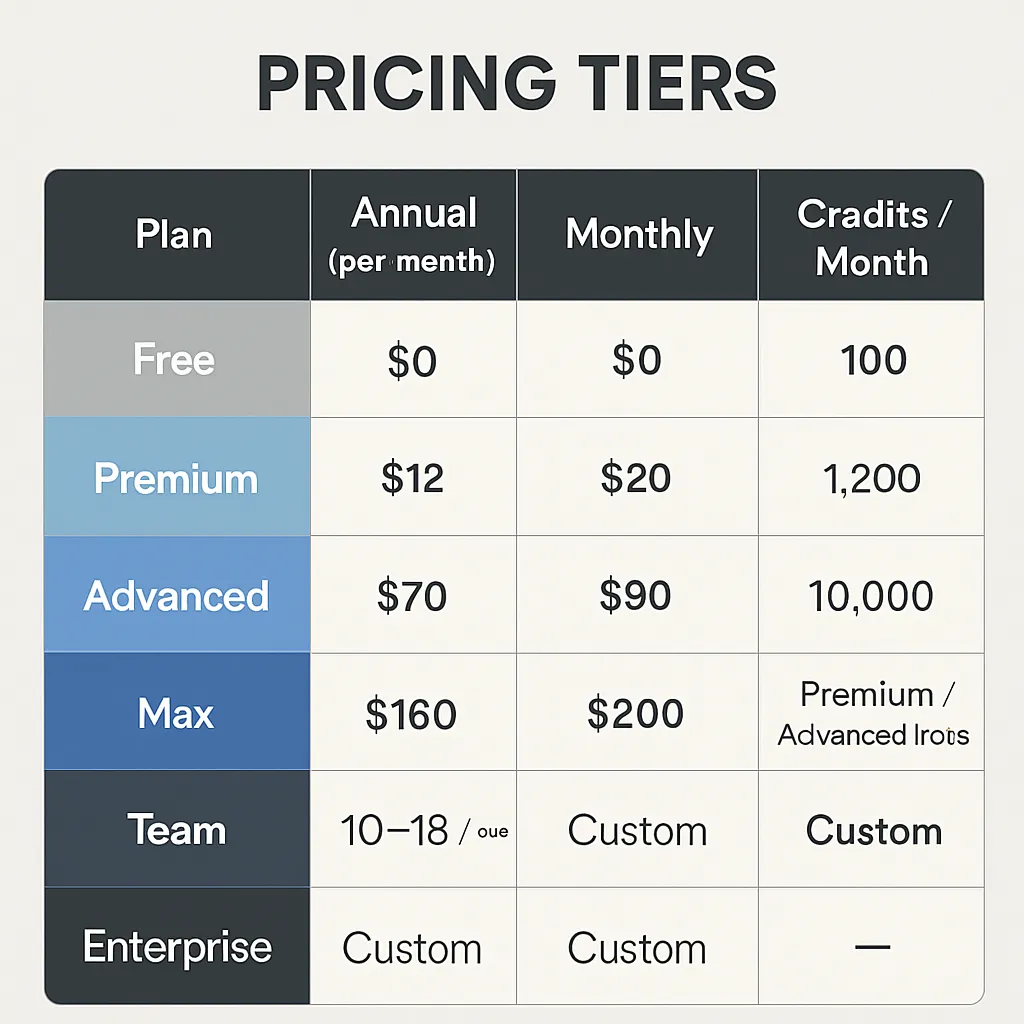
Pricing Tiers
| Plan | Annual (per month) | Monthly | Credits / Month |
|---|---|---|---|
| Free | $0 | $0 | 100 |
| Premium | $12 | $20 | 1,200 |
| Advanced | $70 | $90 | 10,000 |
| Max | $160 | $200 | 40,000 |
| Team | $10–$18 / user | — | Premium/Advanced tiers |
| Enterprise | Custom | Custom | Custom |
All paid plans carry a 24-hour money-back guarantee. Students and users at institutional accounts may be eligible for discounts — worth checking if your university has a site license before paying individually.
The Credit-Burn Problem

Here is what the pricing page does not make obvious: credits are consumed per action, the cost per action is not displayed before you trigger it, and credits do not roll over month to month.
Multiple verified user reports on TrustPilot document 300 credits depleted within one hour of intensive use. The Premium plan's 1,200 monthly credits can run out in a single heavy research day if you are running multiple Deep Review sessions, several Copilot interactions per paper, and exporting citations. For the researcher who uses SciSpace daily or during a thesis crunch, the $12 Premium tier is not a realistic budget — realistically, you are looking at Advanced ($70/month) or Max ($160/month) to avoid hitting the wall mid-workflow.
What to do: Start on the free tier (100 credits) to benchmark your credit consumption rate before committing to a plan. Track how many credits a typical Literature Review search and a Deep Review session consume. Then project your monthly usage and choose the tier that gives you 20–30% headroom.
Start SciSpace Premium — the 24-hour money-back guarantee makes it low-risk to test your real consumption rate.
Who SciSpace Is For
SciSpace is domain-specific in a way most AI tools are not. Its value scales with how much of your work involves academic papers and how much of your output is academic writing. Here is a practical breakdown:
Comparing alternatives? Discover the full ranked list on https://top10k.com before committing to any single platform.
Strong fit:
- PhD students and postdocs conducting literature reviews for thesis chapters or grant applications
- Academic researchers building systematic reviews across a defined paper corpus
- Clinicians and medical professionals reviewing evidence for clinical decision-making or case reports
- Science journalists and medical writers who need to understand papers quickly and cite accurately
Moderate fit:
- Undergraduate students writing research-heavy essays (the free tier may be sufficient for occasional use)
- Independent researchers without institutional database access (280M papers covers most needs)
Weak fit:
- Marketing researchers, business analysts, or anyone whose primary sources are web content, industry reports, or news rather than peer-reviewed papers
- Anyone needing real-time data (SciSpace does not search the live web)
- Users who need systematic review screening with formal PRISMA-stage workflow (Elicit is better suited here)
The Biomedical Agent, released in the 2026 cycle, specifically targets clinical researchers — it understands medical terminology, drug interactions, and clinical trial structures at a level that justifies SciSpace for that vertical above most alternatives.
Pros and Cons — Real User Pain Points
Pros
- 280M+ paper database covers the vast majority of mainstream academic fields
- Chat with Paper (Copilot) is genuinely the fastest way to understand a dense methodology section
- 2026 AI report writing engine produces structured, citation-accurate drafts — not just summaries
- Zotero integration eliminates manual reference entry for users with existing Zotero libraries
- Deep Review surfaces conflicting results and literature gaps that manual reading misses
- Capterra rating of 4.3/5 across 73 reviews reflects consistent satisfaction with core research features
- 24-hour money-back guarantee reduces risk on first subscription
Cons
- Credit system is opaque: cost per action not shown before triggering, no rollover on unused credits
- Premium plan (1,200 credits/month) runs out in a single heavy-use day for intensive researchers
- Performance degrades noticeably during peak periods — slowdowns and occasional crashes reported on weekends
- Customer support is slow and, per multiple TrustPilot reports, frequently responds with templates rather than resolving billing issues
- Refund requests beyond the 24-hour window are routinely denied even when the user discovered credit-burn rates post-signup
- Navigation can be non-intuitive; some features require several clicks to locate
- No real-time web search (paper-only corpus)
SciSpace vs Alternatives — Elicit, Consensus, and Perplexity
The comparison table most review sites skip:
| SciSpace | Elicit | Consensus | Perplexity | |
|---|---|---|---|---|
| Papers indexed | 280M+ | ~125M (Semantic Scholar) | ~200M | Web + papers (live) |
| Free tier | 100 credits/mo | Limited searches | 20 searches/day | Generous free tier |
| Systematic review support | Partial (Deep Review) | Strong (formal screening) | Limited | None |
| Real-time web | No | No | No | Yes |
| AI report writing | Yes (2026) | No | No | Deep Research mode |
| Zotero integration | Yes (2026) | No | No | No |
| Citation accuracy | High | High | High | Variable |
| Best for | Full draft writing | Structured screening | Quick evidence checks | Fast multi-source |
| Pricing from | Free / $12/mo | Free / $12/mo | Free / $9.99/mo | Free / $20/mo |
SciSpace vs Elicit: Elicit wins for formal systematic reviews that require threshold-based paper screening across 40,000+ papers with PRISMA-style workflow. SciSpace wins when the deliverable is a written document — a draft, a report, a synthesis — rather than a screened paper list.
SciSpace vs Consensus: Consensus is purpose-built for binary research questions: "does X cause Y?" The Consensus Meter visualizes scientific agreement as a weight of evidence. SciSpace does not have an equivalent — it is exploratory, not verdict-based. Use Consensus for quick validation, SciSpace for building arguments.
SciSpace vs Perplexity: Perplexity searches the live web and academic papers in parallel, makes it faster for multi-source discovery, and its Deep Research mode produces structured reports with citations. The key difference is that SciSpace's corpus is peer-reviewed papers only, which matters for academic work where source quality is graded. Perplexity's web sources include preprints, blog posts, and news — appropriate for some research contexts, problematic for others.
For a broader comparison of AI research tools, see top10k.com which tracks 500+ AI tools across categories including the full academic research stack.
Zotero Integration — The 2026 Differentiator
The Zotero bridge deserves its own section because it changes the workflow economics significantly for researchers who already use Zotero for reference management — which is most academic researchers in the sciences and social sciences.
Before the 2026 integration, using SciSpace alongside Zotero meant manually exporting citations from SciSpace, importing them into Zotero, and then linking them to your manuscript draft in Word or Google Docs. That friction caused many researchers to use SciSpace for reading and discovery but abandon it before the writing phase.
The direct integration removes that handoff. Papers you save in SciSpace sync to your Zotero library. When the AI report-writing engine drafts a section, it pulls citation metadata directly through the Zotero connection. The practical result is that a researcher who runs a Literature Review session in SciSpace, saves ten relevant papers, and then runs the report writer gets a draft with properly formatted citations already in their Zotero library — no manual re-entry.
No equivalent integration exists in Elicit, Consensus, or ResearchRabbit as of May 2026. This is SciSpace's clearest competitive advantage for researchers embedded in the academic citation workflow.
Mendeley integration is not confirmed as of this review. Researchers on Mendeley should verify current compatibility status on the SciSpace integrations page before subscribing.
For a directory of AI tools that complement academic research workflows, top10k.com maintains a categorized index updated regularly.
FAQ
Is SciSpace free to use?
Yes. The free plan provides 100 credits per month with access to literature searches, PDF chat, and standard AI features. For light or occasional use — reading a handful of papers or running a few searches — 100 credits is workable. For any sustained research session, credits run out quickly. Paid plans start at $12/month (billed annually) with 1,200 credits.
Is SciSpace safe and reliable for academic work?
SciSpace draws citations from its 280M+ indexed paper database and does not fabricate references, which is the primary safety concern for academic use. Copilot and Deep Review outputs should still be verified against the source paper before citing in a thesis or publication. On reliability: the platform experiences slowdowns during peak periods, with user reports of crashes on weekends. It is not a tool to open for the first time the night before a deadline.
Can SciSpace be detected by Turnitin?
SciSpace-generated research drafts use real citations and original synthesis, so they do not trigger plagiarism detection. Turnitin's separate AI writing detection layer is a different question — as with any AI-assisted writing tool, rewriting output in your own voice is the recommended approach for academic submission. Check your institution's specific AI usage policy.
Does SciSpace cite real papers with no hallucinations?
Citations come from the indexed database, so they point to real papers. However, the AI-generated synthesis can occasionally misattribute a finding to a paper that contains adjacent but not identical claims. Always spot-check citations for the specific claim being made, especially in Deep Review output.
How does SciSpace compare to Elicit?
Elicit is stronger for formal systematic reviews requiring structured paper screening across large corpora. SciSpace is stronger when your goal is producing a written document — a draft, a literature review section, a report. If your deliverable is a screened paper list, use Elicit. If your deliverable is prose with citations, use SciSpace.
What is SciSpace Copilot and how does it work?
Copilot is the in-PDF AI assistant. Open any paper in SciSpace, highlight text, and a chat panel opens. You can ask Copilot to explain terminology, summarize a section, or clarify a methodology. It is grounded in the paper you have open, not your entire library, so it stays accurate to the source material rather than drifting into general knowledge.
How many papers does SciSpace search across?
The database contains 280 million academic papers as of 2026, covering science, medicine, engineering, social sciences, and humanities. Coverage is strong for mainstream journals; very recent preprints or niche conference proceedings may not be indexed.
Can I use SciSpace for a systematic literature review?
Partially. Deep Review and the Literature Review tool support large-scale paper synthesis and can surface conflicting results and gaps. However, SciSpace does not provide formal PRISMA-stage screening workflow or the threshold-based filtering tools that Elicit offers. For a formal systematic review methodology, SciSpace works as a discovery and synthesis layer — you would still need to document exclusion criteria and screening steps separately.
How much does SciSpace Premium cost in 2026?
$12/month billed annually, or $20/month billed monthly. Premium includes 1,200 credits per month, unlimited literature review searches, high-quality model access, Biomedical Agent access, and unlimited paper summaries and citation generation.
Does SciSpace integrate with Zotero?
Yes, as of the 2026 update. Papers saved in SciSpace sync to Zotero, and the report-writing engine can pull citation metadata directly through the integration, eliminating manual reference re-entry. Mendeley integration status is unconfirmed as of May 2026.
Final Verdict — Is SciSpace Worth It in 2026?
SciSpace is the best AI tool currently available for the specific workflow of reading academic papers and turning them into structured written outputs. The Copilot PDF chat is genuinely the fastest way to understand a methodology section, the Literature Review search is comprehensive enough to replace most manual database queries for initial discovery, and the 2026 combination of report writing plus Zotero integration represents a meaningful leap over what any competitor offers in the paper-to-draft pipeline.
The problems are real and worth naming directly. The credit system is not transparent — costs per action are hidden, credits do not roll over, and the Premium plan ($12/month, 1,200 credits) runs out fast under real research conditions. Customer support has a documented pattern of slow, template-heavy responses and denied refunds. These are not minor UX complaints; they are structural issues that will frustrate you at the moment you can least afford frustration.
Recommendation by user type:
- PhD student in thesis crunch: Premium or Advanced. Track your credit consumption in the first week and upgrade before you run out mid-session.
- Occasional researcher (1–2 papers/week): Free tier is sufficient for light use. Upgrade only when you hit credit limits on work that matters.
- Clinician or biomedical researcher: Advanced or Max, specifically for the Biomedical Agent. The medical research capability justifies the higher tier cost.
- Systematic review researcher: Test SciSpace for synthesis, but evaluate Elicit in parallel for the screening phase.
Score: 3.8 / 5 — Strong product, trust deficit on billing and support.
Get SciSpace today — start on the free tier, benchmark your credit usage, and upgrade only to the tier that fits your actual research pace.
For a broader look at AI tools across every category, visit top10k.com to explore the full collection.
Ready to Try Scispace?
Start with the free plan and experience the difference AI makes in your workflow.
Get Started Free →